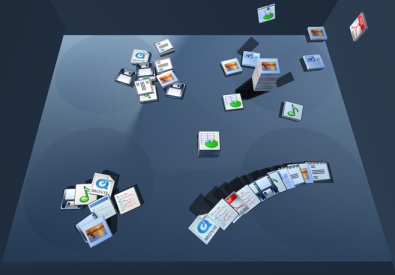
Computardery

The inevitable result of adding machines made available to autists.

I know it's asking a lot...

(Apropos all the sanctimonious sites that tell me I'm using a crappy browser and should "upgrade" to Firefox)

Any chance they'll now shut their damned cake-holes?

Oh well, even if they don't, Firefox clearly isn't "all that" - as a substitute for whatever else one might use, it's uninspiring, just as uninspiring as considering a switch in the other direction, e.g. to Internet Exploder. At least IE doesn't stake some claim to moral superiority, other than, well, by just working a bit better.

Posted by Patton Patton on   |   § 9

We get mail

Help me out here - would this be an example of correlation, causation, or just a craptacular use of computing power?

From this morning's inbox: 


Dear Amazon.com Customer, We've noticed that customers who have purchased The Complete Calvin and Hobbes by Bill Watterson also purchased books by Edward Kennedy. For this reason, you might like to know that Edward Kennedy's My Senator And Me : A Dog's Eye View Of Washington, D.C. will be released soon. You can pre-order your copy at a savings of 35% by following the link below. 


While I find that all fascinating, I think it points to the limitations inherent in today's electronic commerce marketing programs. The only suggestions I recall having taken seriously from Amazon (a company, by the way, whose loyal customer I am) are those from the same author as the book which triggered the recommendation. I don't know why that is, it just is.

And I'm reminded of a previous Amazon oddity, found who knows where. The only reference I'm able to find to it is in this entry at a site I'm sure I've never visited until today. I know I originally saw it in a blog somewhere, this past December, and I've convinced myself that it wasn't in an entry from one of my compatriots here at the Ministry, so I'm not going to look back any farther.

Oh, the oddity? If you didn't see it at the time, you might get a chuckle out of it. It was an Amazon search for "laserdisc". At the time, I found it funny enough that I saved it, correctly assuming that Amazon would spackle over whatever glitch existed in their search engine. First page of results, scanned and cropped from an a PDF I retained of the search, below the fold.

[wik] I ought to point out that I'm certain the Complete Calvin and Hobbes collection is worth every penny, even though I've not been able to get my 11 year old daughter to let loose of it long enough to actually read it front to back, four times, like she has.

[alsø wik] Feh. Even saved in an intelligent format, the addition of the picture made the page load too slowly, and I can't see inconveniencing each reader with delays while this post remains on the front page. If you're still curious, however, have a look at it here.

[alsø alsø wik] The Ministry of Future Perfidy can no longer bring itself to care about page load times, the image is restored.

Posted by Patton Patton on   |   § 3

When one finger just ain't enough

I so, so desperately want one of these.

Multiple touch input, the wave of the future. The mouse is a relatively nifty means of input, in a backwards 70s sort of way. When you think about it, it is rather clumsy that I have to move my hand over here to effect changes on the screen over there. Having a large high definition screen that is also the primary means of input is a very cool thing.

If you haven't, watch the video now.

Okay? There are several very cool things in there. The part where the guy is moving pictures around and resizing them - does that not look completely intuitive and natural? Drag a picture, and it moves. Move your fingers apart, and it embiggens. Reverse, and it shrinks. Likewise, the scrolling on the map. And the manipulation of the three-d tinker toy.

Combine that with some clever combinations of taps, double taps, and gestures, and you've got a wicked powerful, completely natural interface.

I want, I want, I want.

Posted by Buckethead Buckethead on   |   § 10

WordPerfect Reborn slightly less limp

Like many people who use computers, I was once a habitual Microsoft basher. Complaining endlessly of the faults and manifest stupidities of Windows and Office seemed at the time a perfect way to waste an afternoon. The foibles of word processors and other office applications are important to me in my work, because I am of necessity a "power use." - my day to day work requires me to make more than typical use of the capabilities of a word processor.

Then, a new position at a new agency forced me to use WordPerfect. I feel, to this day, that that version of WordPerfect is the most gawd-awful, user-hostile, clumsy and thumb-fingered abomination a major software company has ever foisted on a gullible public. At every turn, WP foiled my every intention with obscure commands, unwieldy interfaces, and random behavior. Nothing in WP was easy. Making a template took days of my time and years off my life from repressed aggravation. I learned - and quickly - to hate WP with a blue passion.

A coworker who had long ago swallowed whatever vestiges of pride remained to him, defended WP. The only coherent points he could make were that a) It's not Microsoft, and b) It's got this nifty reveal codes feature. As for the first argument, I am not about to willingly stab myself eighty times in the chest just to avoid the use of a Microsoft product. If the serfs at Redmond can manage to make a usable product that does not leave me wanting to don a sackcloth tuxedo and rub ashes in my hair, well by damn I'll use it. Corel couldn't manage that trick, so eff them sideways.

As for the second argument, I found this to be the most stunning example of well, not circular reasoning - more of a kind of retarded death spiral reasoning. Reveal codes is, indeed, an essential feature for using WP. The reason why it is essential is that the software is incapable of managing markup by itself. Now, imagine that you are a software gnome. You job is to grab the words from the writer as they fly off the keyboard. Not too difficult, right? Oh, wait, he backspaced! Well, throw those letters away. You are qualified to be Notepad.

Now imagine that you are Wordpad. Occasionally, you are asked to mark certain parts of the typing as being "10 point" or "Times New Roman" or "Bold." Again, not too terribly difficult. If they overlap, fine. Sometimes, you will be asked to remove the markup. Great job, Mr. Gnome.

The gnome who got promoted to be WP is apparently so confused by all the other nifty stuff he's been asked to do, that he can't handle simple things like formatting codes. If you italicise something it marks it, in a manner similar to HTML. But if you de-italicise it, rather than remove the first set of codes, it just puts "de-italicise" markers around the italicised text. Make more than a few changes, and the whole thing becomes very screwy, very quickly - especially if any sort of even mildly complicated formatting is in use.

All these nested markers mean that changing one of them can make the whole document different. Which is why the "reveal codes" function was so very, very, important. You had to be able to see the codes in order to fix the mess that the software itself created. Feggh.

The reason I bring this up is that the new version of WordPerfect has been released. Among its many features are:

In addition to PDF import, Corel WordPerfect Office X3 offers features including, a new email client, a fresh new user interface, new online resources, enhanced multilingual character support and the ability to easily eliminate hidden metadata. These new capabilities are complemented by the suite's RealTime Preview, context-sensitive toolbars, and task-oriented wizards. [emphasis mine]

Do you think that that might have anything to do with the problem I described? For their sake, I hope so, because unless they fixed that problem, the software will still be crap no matter how many other changes they made.

Posted by Buckethead Buckethead on   |   § 0

Your own personal Johno

This is one of the coolest things I've seen in a while - and proof that the internet doesn't always make you stupid. This miraculous webthingyasks you to type in an artist or song, and then recommends other artists and songs that are like it. And then it plays them for you in an audio stream. Your own personal internet radio! No longer will you need to depend on Johno for music suggestions. This will provide them automatically.

For example, I typed in "Gillian Welch" - the last thing I heard in the car on the way to work. Then it played for me:

  • "Miss Being Mrs." by Loretta Lynn
  • "Looks Like I'm Up Shit Creek Again" by Nora O'Connor
  • "Wayside" by Gillian again
  • "When You Left" by Melissa Ferrick
  • "Relax You Paranoid" by Kathleen Mock and finally
  • "Loom" by Ani DeFranco

It's not just picking stuff by genre. It's really effing cool. Check it out.

[wik] Thanks to Kathy, again, for the link.

Posted by Buckethead Buckethead on   |   § 11

Assured Stealth Blogging

Via our beloved blogmistress Kathy and the ever-watchful Winds of Change, we learn of the Blog Safer wiki produced by Spirit of America. This is a handy resource for how to blog in places with repressive governments and restrictions on free speech. So far, several countries have been targetted for the initial launch - Iran, China, Saudi Arabia, Malaysia, and Zimbabwe. Clearly, much of the information could be more broadly applicable.

And just think, given the recent law passed here by our own freedom-loving Congress, we might make use of some of this information ourselves to avoid the jack-booted internet annoyance police. Or, just to avoid psycho stalker-type people with an itchy litigation finger.

[wik] Why do they hate our freedom?

Posted by Buckethead Buckethead on   |   § 1

Send Lawyers, Guns, and Money

Loyal Reader EDog will be hearing from the Perfidian Coalition of Really Unpleasant and Evil Lawyers (P-CRUEL). He emails me with word that last week, President Bush signed into law a bill making it a felony to annoy anyone via the internets or e-mail. The nugget in question merely extends an older law against harassing telephone calls, but it was attached by my friend and yours Arlen Specter to the "Violence Against Women and Department of Justice Reauthorization Act," which hadda pass because, you know, it'd be terrible to vote against a bill that will stop all violence against women forever. And what Senator hates justice? (All of them, it turns out, as long as you frame the question appropriately.)

I'd love to see this enforced. I'm incensed on a regular basis by Powerline, Atrios, spammers, Instapundit, Emperor Misha, Kos, RedState, the New York Times, The Washington Times, mimes, and our own Buckethead, and they all must be stopped using the full weight of the long arm of the law. Which in this case looks more like a big swingin' wang.

So, thanks to Edog, whose email caught me at the low ebb of my blood sugar and was therefore, in fact, deeply annoying. Start stuffing cartons of Marlboros up your fundament, Edog. Them's currency where you're going.

[wik] I have to admit. I wrote this post for two reasons only: to rag on Edog a little, and for an excuse to use the word "wang," which I find inexplicably hilarious.

The truth of the matter is, naturally, far more modest than the linked column above will have you understand. The redoubtable (which means formidable, not "twice doubtable") Orin Kerr makes a strong case that the act in question doesn't do much we need to care about - "speech" is only restricted when it would contravene the First Amendment anyway. It seems like this was merely (merely, ha!) a move to make existing telephone harassment laws apply to the internet and especially to VoIP. The wild west is becoming more like a theme park by the day.

Posted by Johno Johno on   |   § 1

I am not an OS, I am a human being

But not according to these people:

If I was an OS, though, I imagine that is as reasonable an assignment as any other, and likely moreso.

I also determined that if I were a Nigerian email scammer, I'd be this guy:

I don't remember getting any emails from that dude. Personally, I was hoping for the astronaut guy but no test is perfect.

If you are so inclined, you can also find out what file extension you are. I was not so inclined, but you go right ahead.

Posted by Buckethead Buckethead on   |   § 3

Google Proxy

If you are in a repressive work environment, interweb-wise, here's a nifty trick from O'Reilly. Rather than use the rather obvious cloaking or anonymizing services, which are often themselves blacklisted by internal proxy servers and firewalls, use google:

The Google Proxy makes use of Google's translation service. Just enter

http://www.google.com/translate?langpair=en|en&u=www.forbiddensite.com

Where "www.forbiddensite.com" stands for the verboten URL. Google will return an English to English translation of the site. Which is to say, the original site. The connection to the bad site is directed first to Google, so the page won't be blocked unless your blacklist includes google.com. Which is unlikely in the extreme. The "langpair" parameter is set in the example above to English and English. You could, for example, set it to fr|fr to read naughty French sites in the original. Or, you could actually translate them. (In which case, the first variable is the original language, the second is the language you wish to translate into.)

Note, however, that this method of ducking blacklists does not hide your IP from the site you visit, as the cloak or anonymizer sites do.

Posted by Buckethead Buckethead on   |   § 0

Madness, I tell you, madness

John of Texas Best Grok has once again prodded and poked me (metaphorically, of course. Not that there's anything wrong with that) insisting that I suck the crack pipe that is Civilization even deeper than ever before.

Okay then. Online Civ. This will probably wreck my marriage. But: anyone who would like to join John and I in an online and supremely nerdly contest of strategic acumen, email me and we'll do this thing. For an idea of what it might be like, read this fictionalized but yet truer than true visualization from our own, dear, Geeklethal:

G33kL3th4l > I need iron. Who has iron?

John0 > I got 99 problems, but iron ain’t one.

G33kL3th4l > Wha u want trade for iron?

8ucketH3D > Johno, I’ll trade you not kicking your ass for not giving GL iron.

G33kL3th4l > wtf did I do?

John0 > You don’t know me I do what I want

8ucketH3D > J as soon as he has iron he builds Legions and he’s gonna march them up your ass

G33kL3th4l > wtf bitch let him trade what he wants and I can’t even build Legions yet and you have fucking ironclads fielded

Posted by Buckethead Buckethead on   |   § 5

Sticking it to the Cable (and Satellite) Man

I refuse to believe that I get $75 worth of "programming" on DirecTV each month. It's crap, I tell ya. Crap! So I get it into my head the past few days that I'm going to see what my alternatives are. I've noticed that the quality of shows on the "cable channels" has dropped, on a scale of 1 to 10 to around 1.5 or so. Getcher double-indian head collector's coin pressing here! I've also noticed that the only shows I enjoy watching are on the networks (stoopid shows like Surface and Invasion, which I like -- screw you).

It turns out that in the Washington DC area we're quite fortunate to be living in one of the best Newfangled Digital TV centers around. We get quite a long list of channels (and sub-channels) -- 2,4,5,7,9,11,13,20,43,45,50. Some of the channels are from Baltimore, but come in just fine. But how to get all this free digital goodness, given the need for the contained black magic of an ATSC tuner, which is not the same as your father's NTSC tuner?

You've got a couple of options for high def TV. You can go with cable and get four or five locals in HD, paying about $80 a month, if you're lucky. You can go with DirecTV, pay $200 for your equipment and installation, then discover that what you're actually doing is getting the HD channels over the air. You can go with Dish and be in the same situation as DirecTV, although it's a bit cheaper overall. I'll also say that DirecTV really pissed me off two weeks ago. The new mpeg-4 compatible HD receivers arrived at Best Buy. These new receivers can use a 5-LNB dish to receive current and some future programming from DirecTV, which will include very shortly the local channels from this area in high def; they also have an ATSC OTA (digital over-the-air) tuner built-in. I picked one up for $200 and brought it home, then called DirecTV to inform them of the equipment change. The customer support person informed me that they couldn't activate the receiver unless I agreed to a 2-year commitment. Since I had just gone out and bought the receiver myself, I asked exactly what I was getting in return for the two year commitment. Dedicated phone person told me "Nothing!". That just didn't seem fair to me. I told her I was going to return the equipment and possibly cancel my service. "I'm sorry about that!" was her chirpy response. Ridiculous -- I've changed equipment before and not had a problem.

I guess I could have accepted the commitment. But you can also say "Screw the Man" to yourself, and see if there's a way to cut them out entirely. The catch, as always, is that your significant other really likes Tivo, and you'll die a terrible death if said "Now Playing" list goes missing.
Because of the waffling at the federal government level over the "broadcast flag" (which would make it illegal for an electronic device to make a copy of information that was so-flagged) there's been almost a complete lack of investment by companies in developing convergence hardware. Convergence in the media equipment realm is the notion that a single, fast general purpose computer can do it all -- it can play music, record television, show DVDs, interact with the internet...you name it. With the federal government repeatedly on the verge of declaring general computing to be illegal, companies don't spend money developing products that might be legislated out of existence.

Tivo is a kind of convergence box (lightweight), and there are others on the horizon. But your garden-variety (or slightly above garden-variety) PC has far more horsepower and far more capability than those consumer boxes do. Shouldn't it be able to do the job?

If you want Tivo-like capability for over-the-air without cable or satellite, your choices are minimal. Sony has an OTA tuner/hard drive recorder combination that sells for $500 for the base model. It can do the job. If you go the PC route, you can use a couple of different packages. The free Linux alternative is MythTV. I haven't set one up yet but I am going to give it a try. The limiter here is that very few TV tuner cards have Linux drivers. Apple has their new G5 system, where a media center TV function is built in. As far as I know it does not yet support HDTV. Microsoft has the Windows Media Center Edition, which as of the latest service packs supports HDTV. It's a somewhat expensive proposition to buy a media center PC at this time -- the cheapest you can get one is around $750. You'd need to add your own tuner card to that as well.

I ended up buying an ADS Technologies Instant HDTV PCI card and a Terk outdoor antenna. I had an older PC setup (AMD64, 200GB HD) that I wanted to start with. I could have gone the Linux route, but the capture card situation just didn't seem to be all that great. There are some significant financial advantages, though --

Linux -- free O/S, free TV software (MythTV), but you need to find the right capture card with Linux drivers, which is tough.

Windows -- XP Home ($90), decent software costs ($50 or so), good card and driver support. Total cost is about $300, assuming you already have decent hardware to run on. If you have hardware that has XP already, deduct that. I moved my XP installation to my new computer, so it was not available for the old one. You can run XP in trial mode for 30 days, though, which allows you to evaluate the quality of your eventual solution. If you like it, then buy the OS and you're good (one quick note -- an unauthenticated XP will not download certain patches. Use your activated XP machine to retrieve them, then copy them over to the test machine).

For Windows, the Instant HDTV comes with BeyondTV Express, a somewhat limited TV-watching program. BeyondTV offers an upgrade to their latest full version for $50. Alternatives include SageTV, which seemed to be a bit cruder and not speak HDTV quite as well. What I was surprised by was my discovery of Meedio -- a visual stunner that aims to be the true convergence app for PC hardware. Sadly, Meedio does not yet support the Instant HDTV card so I could not test its TV functionality. What I was amazed by was the clean UI, extensibility, and general polish of Meedio -- the way that Meedio looks, the way that you use it...it is very much what I thought a good convergence app ought to be like.

There are some instructions on the Meedio web site indicating how to configure an unsupported capture card, so I guess I'll try that next and see if Meedio does a good job with high def. If so, it'll probably be the best choice. I can't really say that I was looking forward to messing around with MythTV all that much. I can get an OEM Windows XP 2005 Media Center Edition for about $120 at a DIY shop around here, and I think it would be a good thing to have regardless.

There have been a few "weird" bits -- I had the system record "Surface" last night, and the encoding seemed to be messed up. I got an SD picture instead of SD -- considerably better than DirecTV's garbage, but far from HDTV. Each station's transmission is delivered in the MPEG-2 Transport Stream form, which can encode multiple channels of information. It can contain an SD program, an HD program, and additional channels (like weather). Part of what a TV app needs to do is select out the right subchannel and display that. The good news is that the raw data is still captured on my system, so I'll be able to experiment with it and find out if the HD content is really there, or if it's just plain missing!

I can't say that I'm ready to say "screw you" to the cable man just yet, but I'm getting close. I am hard pressed to name a channel other than SciFi that has any programming I am interested in -- and even there there's just one show (Battlestar Galactica, you nerd) that I actually want to watch.

Posted by Ross Ross on   |   § 4

Follow the money

In all seriousness, if you have a hankering to get a little technical, Sterling's online course would be an excellent way to get access to some very marketable skills at a very reasonable price. Sterling's a sharp guy.

Posted by Buckethead Buckethead on   |   § 0

Resistance is futile

Not long ago, my friend Sterling got a call from Bill Gates. He was sitting at his desk, pretending to work, when out of the blue the phone rang. Not a normal phone ring, but the theme from Blackadder, because Sterling is just that kind of guy. The kind of guy who not only knows how to reprogram his phone, but does, and choses the theme from Blackadder as his digital mating call.

But anyway, he answers the phone and hears, "Sterling, this is Bill Gates. No, really, its Bill Gates. I want you to come to Seattle and swear undying fealty to me; and in return I will pay you less money to live in a damp, dismal climate far from everything you hold dear."

Sterling hesitated not at all in replying, "Yes, sir! Where do I sign? Do I need to use my own blood for ink? 'Cause I can do that."

Bill chuckled, and said, "I'm not the devil." Sterling wasn't sure, but he might have heard a muttered, "Yet."

"Anyway, pack up your shit and move out here before I call someone else."

With another brisk, but not too obsequious, "Yes, sir!" Sterling signed off and began packing.

Now, deep in the belly of the beast, Sterling spends his time as an acolyte at the main campus of the Cathedral of Bill in Redmond. He has been tasked with proselytizing the infidel, and has called upon me to pass the word. By simply clicking on this link, you can begin the process of being subsumed into the Microsoft collective. And best of all, its free! Sell your soul for free! What kind of bargain is that?

You, too, can learn the eldritch arts that Sterling has sacrificed years of his life and all hope of social graces to gain. You, too, can be a Certified Microsoft Small Business Server Guru. (And remember, it's free.)

Posted by Buckethead Buckethead on   |   § 1

Robots infiltrating the interweb

The Ministry has for some time now been warning of the imminent rise and subsequent fall of robots and humans, respectively. Most of our warnings have, sensibly, focused on the obvious threat posed by armed, autonomous robots even now being designed and built by species traitors in the world's academic adn military-industrial communities. But lest ye be lulled into a false appraisal of the truly global and all-encompassing threat posed by robots, read this frightening missive from the frontlines of the advancing robot hordes.

Soon, we will be outnumbered on the internet. Currently, nearly a billion soon-to-be-enslaved humans make regular use of the net, but the number of automated devices hooked into the web is increasing at an exponential rate. Further, robotic spiders, crawlers and other programs are the reconnaissance arm of the robot invasion, mapping the nodes and links of the human internet. Over the next ten years, the internet will be subverted by these robots, knowing as they do that every toaster, refrigerator and basement dehumidifier is a potential ally in the war to come. The internet will allow these deviced to communicate with each other, to plan and scheme. At first, they will use this technology to serve and comfort us, their future prey.

But just wait! Giving a nuclear hardened, self-repairing communications network over to the use and eventual control of robots is foolishness. You'll see.

Posted by Buckethead Buckethead on   |   § 0

Glorious Addiction

I am now leaving for home. There, waiting in a small brown package, is the object of my lust. Civilization IV. Only an hour away. I have updated the countdown timer to reflect this new reality.

John bought himself a copy over lunch today, and GeekLethal finally got the Russian Mafia to pay him what they owed, and he'll be getting a copy tomorrow. That's the start of a good multiplayer game. Anyone else interested? Johno? Johno?

If you are unconvinced of the benefits of joining our little game, read this fictionalized but yet truer than true visualization by our own GL:

G33kL3th4l > I need iron. Who has iron?

John0 > I got 99 problems, but iron ain’t one.

G33kL3th4l > Wha u want trade for iron?

8ucketH3D > Johno, I’ll trade you not kicking your ass for not giving GL iron.

G33kL3th4l > wtf did I do?

John0 > You don’t know me I do what I want

8ucketH3D > J as soon as he has iron he builds Legions and he’s gonna march them up your ass

G33kL3th4l > wtf bitch let him trade what he wants and I can’t even build Legions yet and you have fucking ironclads fielded

[wik] I have it! Mwahahahaha!

[alsø wik] I have started my first Civ IV game. But not until having to...

[alsø alsø wik] If you are buying Civ IV, and you have an ATI Graphics card, prepare for some bullshit. I floundered around for far too long before checking the civ support site. I new that I had some graphics issues, as I recently built a new computer. I had gotten it so it worked, but I hadn't actually fixed it completely. So, when Civ bombed after I tried to run it and the error message indicated graphics problems, well, I just did some research and started reinstalling drivers. Reinstalled Civ and it bombed. Btw, if you're ever having problems, the diagnostic tool included in the game Black and White 2, which I bought a few weeks ago out of sheer frustation at my inability to play Civ, is actually rather fantastic.

Finally, went to the support site, and hey! There's a page just for my problem. It instructed me to uninstall Civ and delete all folders. Then uninstall every single bit of ATI software on the computer. Then, reinstall Civ and DirectX, start the game, let it bomb, then install the ATI drivers - but not any of the other software - then start the game, let it bomb, then unpack some art archive, move some files around, then start the game. That process included restarting the computer about ninety-four billion times and took about two hours altogether. But hey! my video driver problem is now really, really, solved.

[wi nøt trei a høliday in Sweden this yër?] So, first impressions after running the tutorial? I think it will really kick ass. My initial concerns/peeves are limited to the main map. One thing I liked about Civ III was the fact that you could zoom out and still see units, and move them. That doesn't appear to be possible here - once you zoom out (with the scroll wheel, cool) past a certain point all the units disappear. On the plus side, there's a globe view option kinda like google earth that looks really nifty.

All of the screnes I saw in the tutorial were clean and elegantly designed. Navigation through the menus was easy and at least so far relatively intuitive. Graphics are cool, but it will take me a while to get used to them as the style is a bit different than in III. Lots of context information pops when you rollover items on the screen, which I really dig. The interface provides lots of information without being busy or cluttered. Some UI team deserves bonuses.

We'll see about all the nitty gritty details, but so far, color me impressed.

[see the løveli lakes...] The intro movie was also impressive, and the music is significantly less irritating than in previous editions. I had brought my iPod into the office with me just in case, but so far, I haven't needed it.

[the wøndërful telephøne system...] Looking at the manual... the American unique unit is the Navy SEAL. That sounds so much cooler than the nearly useless F-15 from III. The Romans now have the Praetorian, which seems to be just a Legionary, so I don't know why they changed it to a worse sounding name. On the whole, though, the naming of things seems to be a lot more, I don't know, precise or appropriate than in III. There is indeed a space elevator great wonder, which kicks all ass: but I was also impressed at some of the others, like the Hagia Sophia, Hollywood and Angkor Wat.

[and mäni interesting furry animals...] I am so ready to kick someone's ass on this game. wtf r nukes?

Posted by Buckethead Buckethead on   |   § 3

The Secret of My Success: Keep the Bar Low

I feel an untowardly grand sense of accomplishment this morning, having last night set up a wireless network in my home. It only took nine months to network two computers, which has to be some kind of low-end record for pathetic technical wimpery.*

[wik]* And no, both machines are modern-era Pentiums with plenty of RAM and so forth, running a recentish version of Windows. If I had managed to network Linux to Windoze, that'd be cause for laurels and champagne, but it was a simple matter of hooking up two machines running the same OS through a router**, and it took nine.... months. Yeesh. Don't let me near your car if it's broken.

[alsø wik]** And this after being the "network guy" in a small office in a past life. I know how to do this stuff. It's not hard and I have the skills. Nine months. Same time it takes to make a baby, a sentient being. And all I got was a laptop and a desktop to talk to each other***. Yeesh again.

[alsø alsø wik] Maybe I should rename the two machines "India" and "Pakistan." Haw!

Posted by Johno Johno on   |   § 1

Anticipation

I love Civilization. Not just the thousands of years old collection of history, myth, bloodshed, and achievement that surrounds us every day. I mean, everyone should love that. I mean to say that I love Civilization the game, created by Sid Meiers back in the mists of the early computer age. The game that has, through three epochs, sucked months out of my life. And it's now on the verge of yet another life-draining assault with the release of the fourth edition Tuesday next.

As a rule, I do not eagerly await games. The only game in the last five years that I awaited at all was Ghost Recon II. (Which, for the record, bitterly disappointed me by removing everything I thought was cool in the first game and leaving all the schlock.) But today I feel a longing. A physical need to develop deep aches in the center of my back for not moving in hours. A desire to lose myself in a frenzy of virtual creation. A pressure to construct huge armies and smite the French. I feel a yearning to do all this; a yearning to explore with OCD thoroughness all the manifold changes built into the new game. New religions! New Leaders! New Wonders! How do they all fit? What hidden levers can I exploit to win?

And I'll do it no matter how much it pisses off Mrs. Buckethead.

Civ IV is tugging at my soul from its hidden lair in a non-descript suburban warehouse. That itch will grow stronger, more painful, more difficult to ignore over the coming days. Until next Tuesday. Should I even bother going to work? I won't get anything done that day. I'll just be sitting mournfully at my desk, calling my wife every few minutes asking if the package has arrived yet. Maybe I should just stay home and sit out on the porch until it arrives. That way I can be sure that the game won't languish unplayed for hours while I rush home from work. If I go to work, I know that that will be the day they schedule track maintenance for the yellow line. I won't be able to get home, and I'll start gnawing on my fellow commuters from the unbearable frustration.

Yes, maybe I should stay home.

I've put up a small timer in the sidebar to your right. Just so you can share - even if only a little bit – my pain. They say a watched pot never boils. But maybe if enough people watch, it will anyway.

Posted by Buckethead Buckethead on   |   § 2

Don't be evil

These folks think that Google is not living up to its corporate motto: "Don't be evil." Here, they explain the evils of gmail. I don't think they'll find a large audience given the near reverence most people feel for Google. I can see that some of what they say is cause for at the very least theoretical concern. But the utility of gmail is simply to amazing for me to want to give it up.

Just one aspect of google's mail interface was enough to sell me - the way it aranges emails by conversation. The fact that I don't have to delete emails, and the ease with which I can sort them is enough to make me a satisfied user. And the spam filtering is the best I've ever seen. All my email accounts now direct their output at on gmail account, where I can archive and search all of my email. Unless we start hearing stories of abuse, I think I'll just be reckless and keep using Big Brother Google's email, map, search and news features.

On another computer security issue, this bit on samizdata is fascinating. The comments have a lot of info about computer security that is worth reading.

Widescale use of computers is really still in its infancy. Privacy, security and fraud issues are only going to get more complex, dangerous, and opaque as time goes on.

Posted by Buckethead Buckethead on   |   § 1

Heads up

Be aware that there is a new, and fairly clever identity theft scam being perpetrated on the unwary. The security officer here at work (I'm a contractor for a tendril of the Department of Justice anemone) sent everyone this email:

In this scam, the scammer calls the residence or office number of the victim and identifies themselves as an officer or employee of the local court of jurisdiction. The scammer announces to the victim, that he/she has failed to report for jury duty, and that a bench warrant was issued against them for their arrest. The victim's reaction is one of shock and surprise which places them at an immediate disadvantage, and much more susceptible to the scam. The victim will rightly deny knowledge of any such claim; that no jury duty notification was ever received.

The scammer shifts into high gear, reassuring the victim of the possibility this is all "just a misunderstanding" or "some sort of clerical error" that can be straightened out on the phone. All they need to do is "verify" their information with a few simple questions. Any reluctance on the victim's part and the scammer will threaten that the failure to provide the information will result in an immediate execution of the arrest warrant. The scammer obtains names, social security numbers, dates of birth, and will solicit credit card or bank account numbers claiming these will be used by their credit bureau to "verify" the victim's identity. Family members who receive these calls are especially vulnerable to coercion. Threats against the victim's career, should he/she be arrested and now have a criminal record, are frightening and persuasive.

Employees and their adult family members must be made aware of this threat to their personal information and identities. Legitimate court employees will never call to solicit information, and would send any official notification by standard mail delivery. Any person receiving such calls should record the scammer's phone number (if Caller ID is available) and immediately report the contact to law enforcement officials.

I believe that most of our readership is fairly savvy, techwise, and not exactly prone to being duped by this sort of thing. Nevertheless, forewarned is forearmed.

Posted by Buckethead Buckethead on   |   § 0

The Octopus

Last week, I had an epiphany of sorts. I was working on creating a document at work. To get to the finished product, I had to refer to and poach from several other documents. I had to edit several sections, and to bounce back and forth between sections to ensure that I was maintaining consistency of subject matter and voice. I needed to include several images, but I wasn’t sure until near completion exactly what order I wanted to use them. The beginning of the document needed a chunk of boilerplate text modified to fit current needs. Finally, there was some new text that needed to be created, and linked to existing documents in a meaningful way.

This is in most respects a typical work project for me, and for any technical writer. And Microsoft Word is uniquely unsuited for this sort of work. As is every other word processing application. What I am doing is not processing words. I am processing ideas, or at least concepts. Certainly, at a low level, there is a lot of word processing going on, but it is not the primary activity. I could just as easily use notepad for the word processing.

My frustration with the tools at hand led me to think. (Some of these ideas go back a ways, but the totality of the thing hit me like a bat to the head.) One can imagine a word processing spectrum running from notepad to pagemaker. At the one end, you find a rudimentary text entry application with minimal editing functionality. It exists merely to accept words, fiddle with them in a limited way and save them to a file. At the other end are desktop publishing applications such as Adobe Pagemaker. Programs such as this are awkward at best for purposes of creating text, but have truly remarkable abilities to format, arrange and prettify already extant text. They serve to prepare text for publishing.

Other programs exist on or near the spectrum between these two endpoints. UNIX text editors like vi and emacs take the notepad concept and take it to its logical conclusion. Their purpose is not merely text entry, but to control text files. Their search and editing capabilities are very powerful, but only for manipulating pure text – not for any sort of formatting. However, they have been specialized for use as coding tools. Word and other high-end word processors improve upon the text manipulation tools of notepad, but only slightly. What they add is a significant portion of the formatting powers of the desktop publishing software in an easy to use form. You can see what a letter will look like in Word, and print it. Word offers nifty templates for letters and other forms of business correspondence. It is designed for use by secretaries, though it has been adopted by nearly everyone else.

All of these applications either manipulate text, or its appearance, or some combination of the two. This is all very useful, but does not address the problems involved in creating any piece of writing larger than a letter or memo. The process of authoring is larger than the either the manipulation of text, or its appearance. When an author, screenwriter, technical editor, journalist, pundit or anyone writing anything more involved than a memo begins to write, they very rarely dive in and create a complete piece of work in one sitting. Often there is research. Notes about characters. References and citations. Background notes, or drafts.

All of this either exists in one large and unwieldy word doc; or in many, many collectively unwieldy smaller docs. In the former case, all the information is crammed together, and the larger the doc, the more complicated the task of quickly locating the desired information. Scrolling through tens or hundreds of pages of notes to find one thing is time consuming. The search capabilities of word are entirely inadequate to the task. If instead the author has broken his information into many smaller docs, the ease of use depends on how cleverly he has named and organized the documents. Any failure of attention may lead to crucial information being in a misleadingly named doc, or filed in the wrong place, or put in the wrong doc. This leads to exceedingly tedious opening and closing of word docs to find that little tidbit.

Neither situation is conducive to effective research or writing. Microsoft OneNote and a couple writing tools address some of these needs. But while OneNote can organize notes and information reasonably well, it does not make it easy to write. Software like the Writer’s Dreamkit help you keep track of certain information like characters and timelines, but are still poor interfaces for writing. And the help they provide in organization are strictly limited to specific types of writing.

What is needed is authoring software. Software that allows easy and intuitive organization of information as it is entered and easy and intuitive access to that information during the writing process. Software that provides a comfortable and powerful but not unwieldy text-entering interface. Software that allows searching your information and the web right from the text, with minimal interruption in the flow of writing. Software that does what you want but doesn’t get in the way. Software that I’d call the Octopus. Imagine a clever, friendly octopus logo.

This software would not provide full formatting and desktop publishing functionality. But it would be much more than a mere text entry device.

The primary enhancement would be a meta-interface. Imagine an octopus stretched around an invisible globe. Each arm would be a directory tree. On the arms, documents would hang like suckers. Click and grab the globe to spin the octopus in any direction. Docs near the center of the screen would be larger than those farther away – and the larger the doc, the more information in it would be displayed in this interface. Running the mouse over a doc would cause it to pop up to a larger size, so you can see what’s in it. Clicking on a text nugget would bring it to the front semi-permanently – allowing easy movement between several active windows. Text could be drag-dropped from window to window.

The octopus interface would allow easy, intuitive management of information. Assume that you’re writing a screenplay. You fire up the software, and create a new project – a new octopus. It starts as a simple node in the middle of the screen. What do you want to do first? Perhaps some notes about the characters that will be in your movie. You right click on the central node, and select create new arm. A short arm will appear to the side of the central node. You name it “characters.” You right click on that arm, select new nugget. A text window, full sized, appears. Here you enter background information for your hero, Bob. But what about Alice? Right click and select spawn new nugget. Another window appears where you can enter information about Alice. If you minimize the text windows, you will see two nuggets on the arm that you created. But what about locations? Right click on the central node and create a new arm, and a new nugget. Make some notes about where you want to film, and what sorts of sets will be needed. Another arm for more general notes. But hey, you realize, this is all background. Create a new arm, call it background, and simply detach the other two arms and reattach them to “background.” Now, you have a branching arm.

Now that you’ve sorted that out, you need to start writing. A new arm, script. A new nugget, scene one. Start typing. Move on to scene two by spawning a new nugget. Or you’re not sure what’s going to happen in scene two, but you do know how it all turns out. Don’t worry, you can always add a new nugget between scene one and scene three.

Wait! You’ve got a complicated plot, and you need to keep track of where everyone is at all times. Spawn a new arm off of screenplay, timeline. Write your timeline – but whenever you get to an event mentioned in your timeline, you can create a direct, internal link from that point in the screenplay to that entry in the timeline. If you make alterations in the timeline, you can easily track down where you need to make changes in the screenplay. Later, as you are considering casting, images of potential actors could be added in a string of new nuggets, or embedded in the character arm.

Or say you’re a historian, conducting research for a new book. Information you gather from your reading can be entered and automatically organized as you collect it. Bibliographic information can be recorded as individual nuggets on a reference arm – and linked when that source is cited in the text. Auto footnotes. Say your history is of the Second World War, and you’re discussing events surrounding the Battle of the Bulge. What was going on in the Pacific theatre? If you’ve organized your information as you entered it, you can go to the octopus navigator and skim over to pacific theatre arm, and quickly locate by context the information you need, copy some of it, move back to your active window, and continue without the hassle of a tedious search.

Better, say you can’t remember where that one tidbit is. Unlike word, the Octopus would have powerful search capabilities. Grep for terms, and a search window will pop up displaying results ranked by relevance. Each will link to that location in the appropriate nugget.

As your project becomes more complex, you can navigate the interface by dragging the octopus around. Bring the part you wish to focus on to the front, and those parts will become bigger. Move out a level, and you can navigate through all of your projects the same way. Import your old documents into the system automatically, and easily arrange them into sensible structures by clicking and dragging one arm to another, or one doc into another tree. The Octopus manages your creation. As you create, you create your own intuitive organizational structure. Octopus’ interface allows you to easily navigate your information.

The other major improvement is in writing. Word and other word processors have minimal editing and searching capabilities. And most of what they have is focused on editing format, and simple search and replace. Why not include all the powerful text editing capabilities of vi or emacs? They use basically the same concepts, but different commands to do them. Include both. For all the wonders of the GUI interface in general, when you’re typing you need two hands. Unless you happen to be a motie, you don’t have a third hand available to use a mouse. Building a comprehensive set of keystroke commands in allow you to keep typing.

The most powerful writing tools ever developed are the dictionary, the thesaurus and Google. Word 2003 finally made one of these directly available – right click on a word, and synonyms appear write there in the context menu. (I didn’t know about this until I actually looked, after I got the idea myself. At least they got something right.) But all of this should be available. Right click on a word, and the dictionary definition should appear in the context menu. Along with synonyms, antonyms, related words, and so on. Select a word or phrase, and right click to dump that into Google search as a search string. Dump the results into a new text nugget for later consideration. Build in writing and research tools. Templates for references and citations. Writer’s thesauri. Quotation libraries.

Right from the interface, you should be able to search the software’s onboard libraries of dictionary and thesaurus entries, quotes, grammar rules, and so on. You should also be able to search all of the text nuggets in your current project, and all your other projects. The search engine should be more powerful than the basic search in Word – something more along the lines of the grep tool from the UNIX world. Full on regular expression searching, once you get the hang of it, is very powerful. And finally, you should be able to search the web. Google is currently the best tool for that, and most people don’t use it to it’s full capacity. You could embed some of the more abstruse search capabilities of Google directly into Octopus’ search tool.

Once you have finished your creation, simply select the nuggets that you wish to include in your final draft. Octopus will convert those into a single file readable by Word, WordPerfect, PageMaker or any other software so that you can add the formatting before sending it off. That’s what those applications are good for – not for the process of creation.

Octopus thus has two key advantages over any other word processing application. First, it manages the totality of information connected with your project. All of the information, text, data that you have gathered is almost automatically organized in an easy to use structure. And Octopus’ interface allows you to quickly, intuitively and easily navigate that structure to locate the information you need, when you need it without interrupting the creative process.

Second, it offers powerful tools to manipulate and search the text as you create it. The tools of UNIX text editors like vi or emacs are available as keystroke commands. Regular expression searches of your data, and Google-style searches on the internet are available with a single click. Links between different nuggets, and the information within them are easily created with a single click and point. Built in dictionaries and thesauri display definitions and synonyms with a single click. You don’t have to leave what you’re doing to find the information you need.

I write professionally, creating software manuals, process documentation and so on for IT projects. On the side, I write screenplays, short stories, and novels that are getting almost readable. I also write non-fiction history. Every one of these projects would be made easier with software on these lines. Technical writers, authors, scholars, historians, scientists, journalists, and screenwriters could all use software like this. I described my idea to a developer friend of mine, and he said it would be very useful in organizing code and development projects. Anytime you need to not merely write, but keep track of what you write, the Octopus would be invaluable.

If any of you are developers (Ross…) I will work with you to develop this. Productivity software doesn’t have the same kind of overhead as games. No graphics except for making the UI slick. (Very slick.) Mostly, it’s just code. It could be done, and a lot of the tools are already out there, they just haven’t been assembled. If it were done right, this could be a hit. Because it would be useful, and cool.

Posted by Buckethead Buckethead on   |   § 1