Computardery

The inevitable result of adding machines made available to autists.

Son of Yojimbo

Bare Bones Software, makers of renowned text editor that doesn't suck BBEdit, have a side project called Yojimbo. It gets occasional updates, but doesn't seem to have ever been a primary, or even really secondary focus for them. I imagine that it exists solely to scratch a particular itch that one of the developers had - a need for a useful note-taking and information-organizing tool that worked just the way they wanted it to. And since it does whatever it was that that developer needed it to do, it doesn't get much of a push. The itch, it got scratched.

I love Yojimbo. Unlike every other note taking tool I've ever used or even tried, it works with my mind rather than against it. I could use it for project notes and actually find the notes that I had noted. I could organize world-building and background and characters for novels. And I could store random but crucial info like serial numbers and passwords, and then find them again when I needed them. The key to this utility is the tagging system. Yojimbo lets you tag things! That by itself is not very remarkable1in fact, it's entirely unremarkable given tagging's ubiquity. The clever bit isn't the tagging, it's the UI that allows you to use tags rapidly, easily, and purposefully to get to the information you want, and move aside the information you don't. 

Using the list of tags it only takes a couple clicks to narrow the visible pool of notes to a dozen or less, and from there, you can - nearly all the time - just visually grep which note is the note you need2It also has a really efficient normal search.

Image
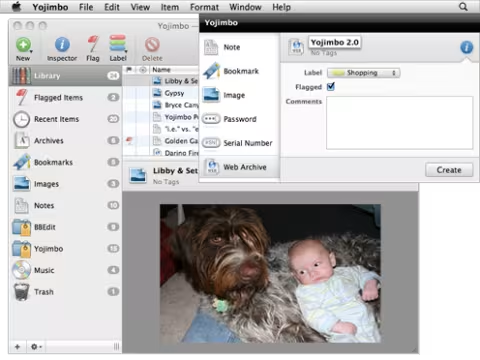
original yojimbo

Here's Yojimbo being cute.

Despite Yojimbo's manifest awesomeness, I've only ever successfully evangelized one person: Mrs. Buckethead; who now happily records all her recipes and homesteading notes in it. 

I recommend it highly. Two thumbs up. But I don't use it anymore. 

But Buckethead, you may ask, "If Yojimbo is 20 pounds of awesome in a ten pound sack, why on earth aren't you using it?"  Two main reasons: syncing and storage. While Bare Bones does offer an iPad companion app, perversely, it is read-only. And there is no iPhone app at all. So even though I have all this note-taking and finding power on my laptop, I do not have any means to view, edit, or add new notes from my phone. Now, I may only get a few ideas a year, but odds are, at least some of them are happening when all I have to hand is my phone. So I've come up with clumsy workarounds to take notes on the phone and then manually move them to where I need them.

Which brings up the second issue. I store most of my project notes in git. Software, novels, games, home improvement. It's a secure backup, It automatically keeps track of versions and can merge changes from multiple users. But there's not a single note-taking app that integrates even a little bit with git. Despite the fact that any project beyond the most minimal can benefit from some note-taking and recording of supporting info. I want to be able to have my notes live in a git-versioned directory. Ideally, many of them, one per project.

I'm not seeing any hint that Yojimbo will ever be updated to scratch my itches3Sad, but fair. Their itches are not my itches, nor should they be in a literal or metaphorical sense.. Yet, I miss my Yojimbo notes. 

Enter the LLM. I've been experimenting, rather heavily now, on using "AI" to build tools that I don't have the time to develop on my own. Top on my list4After adding sidenotes to perfidy, of course. is a Yojimbo replacement. And now I have a functional Yojimbo replacement. Not complete, but it is working.

What I wanted in my own, private Yojimbo:

  • Markdown support
  • Desktop, web, and phone versions
  • Sync between desktop, web, and mobile versions
  • Local data storage in a git-amenable and platform-agnostic format
  • Import from Yojimbo
  • Export in readable formats
  • Share notes via standard OS tools

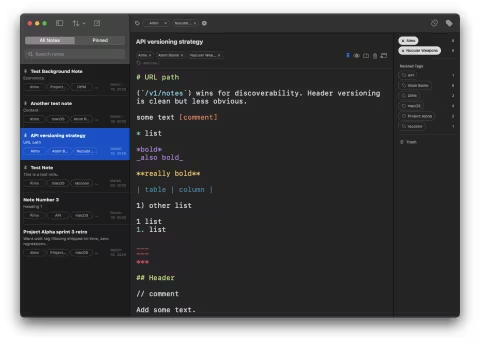
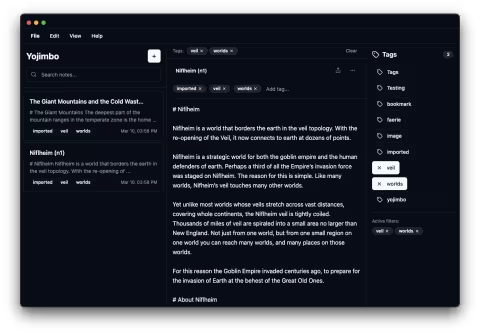
Right now, I have the web version and the Mac desktop version going, and changes automatically sync between them. I can import my old Yojimbo notes. I can share notes. Still need to build the bulk export function, and fiddle with the local storage. But... it's alive and that's a pretty good feeling. Here's a shot of the current version:

Image
Son of Yojimbo

Went with a more modern three-pane layout. And look! Dark mode support.

In our next exciting episode, technical details and crazy ideas.

Posted by Buckethead Buckethead on   |   § 0

Perfidy Random Field

The Ministry of Minor Perfidy Bureau of Retributive Software Development has caused to be created a new wonder: The Perfidy Random Field Module. Great was the suffering of the kobolds and gnomes laboring in the code mines to produce this gem of modern internet technology.

You can see this amazing tool just over there to the left, where it magically displays a different slogan every time you refresh the page. In a perfect world, this gimcrackery will distract you from the years-long gaps in posting that regularly occur here. Some day, we might even conceive of other uses for it.

The Random Field module is an extension of the Drupal CMS, that is, if you have a Drupal site you can install the module in the normal manner. Once installed, you can add a random field anywhere you'd normally be able to add a field - for example, to a node or block or paragraph. There are other means of accomplishing the display of random elements on a page in Drupal, but this one is pretty easy to use. On the random field configuration page, you can create any number of lists containing the elements you'd like to be randomized. You can even give those lists names! You can, miraculously, even have lists of imagessadly, though, there's no integration with the media or media library modules..

Then, when you create a new content item that has a random field attached to it, you merely select the list you'd like to useor no list at all, if that's how you want to roll.. The random field module will then quietly and competently take care of showing your users one randomly selected item from the list you picked. It even makes sure that you don't get the same one twice in row††which technically is a serious departure from actual randomness, but it feels more random..

You can find the random field module here on the Drupal site. Enjoy!

Posted by Buckethead Buckethead on   |   § 0

Perfidy Hidden Format Tips

The Ministry of Minor Perfidy's Bureau of Retributive Software Development has at no cost to you1but at great cost to the code-whittling php pixies delivered another magical tool, available to everyone on the internet2available in that anyone can see it on a webpage, but rather less available in the sense that only Drupal sites can make use of it. This new tool is Perfidy's special and custom Hidden Format Tips module.

The Hidden Format Tips module can be found here, and installed in the customary manner.

But wait, you ask! What does this amazing tool do? This tool has a singular purpose, to hide the format tips that appear below text input boxes on Drupal sites3you can see one at the bottom of this page, providing 1) you're viewing this post on its own page and 2) comments are not closed. These format tips are, indeed, useful at times - they tell your beloved readers what sorts of things they can put into the text box, avoiding frustration and anguish. However, these format tips are often lengthy, unwieldy, and not amenable to change. This module allows you to hide them behind a clickable link - revealing themselves only when they are useful.

But there is a second, secret and subsidiary purpose to the Hide Format Tips module - not only can you hide them, you can change them. On a per-format basis, you can edit the text that would normally appear as a format tip. You can make your own version of format tips, suited to your particular and unique idiom. Or put something else entirely in that space - commenting policies, political manifestos for your agrarian reform party, solutions to Fermat's Last Theorem, just anything at all!

And as an added bonus, you can also change the wording of the link to something closer to your heart's desire. What more could one reasonably ask forplease don't answer this question?

Posted by Buckethead Buckethead on   |   § 0

Perfidy Sidenotes

What is a sidenote1Simplest answer, it's one of these.? The most thorough discussion of sidenotes and their use on the web can be found at gwern.net, and here's a pithy abstract:

Sidenotes & margin notes are a typographic convention which improves on footnotes & endnotes by instead putting the notes in the page margin to let the reader instantly read them without needing to refer back and forth to the end of the document (endnotes) or successive pages (footnotes spilling over).

They are particularly useful for web pages, where ‘footnotes’ are de facto endnotes, and clicking back and forth to endnotes is a pain for readers. (Footnote variants, like “floating footnotes” which pop up on mouse hover, reduce the reader’s effort but don’t eliminate it.)

However, they are not commonly used, perhaps because web browsers until relatively recently made it hard to implement sidenotes easily & reliably. Tufte-CSS has popularized the idea and since then, there has been a proliferation of slightly variant approaches. I review some of the available implementations.

That about sums it up, but you can read on at the link for further discussion of the utility and reliability of various approaches, both in print and online. In fact I recommend that you do, it's very well written and informative.

But why am I talking about them? Well, the Ministry of Minor Perfidy's Bureau of Retributive Software Development has caused to be created a Drupal implementation of sidenotes. You can find the project here, and install it on your own site2provided your site is powered by Drupal, of course, thanks to the wonders of the open source and internet generally. This module is, as you'd expect of a Drupal module, completely free to use.

This is something that I've wanted to have for years and years. This sort of functionality really fits both the style of writing3when that writing actually happens, admittedly a serious issue here. and website design that we have at perfidy. But constraints - time, skill, and laziness being primary - kept my own personal sidenotes project uncomfortably in the future. The advent of AI4so called, or at least large language models with some facility at coding, broke through those constraints and I was able to 'develop' a working sidenotes module in an afternoon.

Perfidy's sidenotes has a number of cool features5at least, I think they're cool, your mileage may vary.

  • Sidenotes can be typed right were you want the note to be placed, wrapped in double parentheses. A text filter converts them into the notes you see here.

  • Notes can display to either the right or left of the body text6This applies to all notes on the site, it can't be changed on a per-note basis. Though now that I think on it, maybe that's a feature I could add.

  • Notes stack - if you have a lot of notes in a paragraph, they won't overlap7Nor will they overlap with notes in subsequent paragraphs..

  • Responsive notes: on small displays like phones, notes collapse from the side to immediately after the paragraph they're in.

  • Styling hooks are available for easy theming.

  • Minimal js to handle endnotes on mobile, and reflow when the window is resized.

  • Label styles include numbers81, 2, 3, etc., symbols*, †, ††, §, ¶, ‖, Δ, ◊, ☞, no labellike this one, and customlike perfidy's trademark endnotes from the old days.

  • Note labels can be overridden on a per note basis, and don't increment numbering of the other notes9like we did in the notes in the previous paragraph..

  • And I just now discovered10Though it makes sense that it would, as long as the text filter is applied. that you can also use sidenotes in comments.

You can even drop images and tables in an endnote, and any normal text formatting. You'd likely want to be careful on the sizes of these things, but a nifty bonus feature. Sidenotes is compatible with the CKEditor wysiwyg that you most commonly find on Drupal sites.

So there it is, The Ministry of Minor Perfidy's custom Drupal sidenotes implementation. Enjoy!

Posted by Buckethead Buckethead on   |   § 1

Drupal Search Nodes and Comments

Build a forum search page that searches both nodes and comments with no extra modules or coding.

Whilst building a new Drupal site, I ran into a problem. 

This site needed a forum, so I installed the advanced forum module and proceeded to build out and style a forum. Like you do. Then, I got to looking at the search page. The included forum search view handily allowed you to filter by sub-forum, which was nice. But it made no distinction between different responses in a thread.

Say you're looking for the word 'nibknack'. Say there's a thread on your forum called 'funny words' and nibknack is mentioned in the 842nd of over 1000 replies. The forum search tells you that your search term appears in the funny words thread, and points you unhelpfully to the beginning of the thread. The reason for this is that generally speaking Drupal associates comments with nodes. In a forum context, the original post in a topic is a 'node' and every reply is a comment. 

Drupal views is a powerful tool, but I ran across one limitation almost immediately. Views are about content (nodes), or users, or comments - but not about more than one. I spent a couple hours looking through Drupal forums in vain for a simple way to search nodes and comments in with one form, with little success. Then I got one hint - if you have more than one exposed form on a page, populating one populates all of them.

So, here's how to create a search page that looks like one form, and that searches both comments and nodes. This example is aimed at Drupal forums, but could be used many ways.

Step One: Forum Search Page

Create a basic page with no content, give it a URL alias something like forum/search.

Step Two: Comment Search View Block

Create a new view, call it forum comment search. Select show "comments" and check the create a block checkbox. Call it Comment Search. Click Continue and edit.

Add your fields. I added comment title, author, post date and comment. (Comment is the body of the comment.) I set the comment body field to 'exclude from display' so as not to clutter up my search results - but that's optional.

Add your filters. Along with the comment: approved I added a content type = forum topic to limit it to just forum posts. Then I added a taxonomy filter to allow users to search by forum, since there are several sub-forums on the site. Pick "Has taxonomy terms (with depth) and select your forum taxonomy. I set the depth to 1 and checked the "expose to visitors" check box. Finally, add a Global: Combine fields filter. Set this to exposed, change the label to Search or something more appropriate, set the operator to 'Contains all words' (or whatever works for you) and select the title, author and comment fields for filtering.

Make sure Use AJAX (in the advanced section) is set to yes. I also usually set the exposed form settings to include reset button and autosubmit, but that's a personal preference.

Save that and move on.

Step Three: Node Search View Page and Block

Create a new view, call it forum node search. Select show "content" of type "Forum topic" and check both the page and block checkboxes. Put the URL for the forum search page you created in step one into the path field for the view page. Select unformatted list and fields for the Display Format options. Click continue and edit.

On the page display, add fields just like for the comment view. However, you'll have to add the author relationship to get the author name. I added Content: Title,(author) User: Name (by ), Content: Post date (Created), and Content: Body (Node Body). Like with the comments view, I set the body field to excluded from display.

Add filters. Same as before - content: type =  forum topic, content: has taxonomy, and global: combine fields filter. These will automatically be added to both displays. Make sure that the taxonomy and combine field filters are set to exposed.

Since you've already clicked on advanced to add the author relationship, move over and click on the "Exposed form in block" and click it. Set that to yes, and then set Use AJAX to yes as well.

Check the settings on the block display, including the Use AJAX, and then click save.

Step Four: Set it all in place

The views you created themselves created three blocks. A comment search block, a node search block, and an exposed form block. Go to admin/structure/block and configure your blocks. The three blocks all need to be set to appear on the page you created in step one. Put the exposed form block on top, and then the node and comment search blocks below. I put them in two regions, but whatever works for your theme. Set the titles to <none> and have them only appear on /forum/search.

Now, if you go to /forum/search, you'll see an exposed form with a search text field and a drop down for all your forums. Then, you'll see the node seach block (with its exposed filters) and then the comment search block with its exposed filters. If you type anything into the top filter, you'll see it appear in the others, and then each block will serve up its search results.

Just use some css to hide the exposed filters on the second and third blocks, and now you have one page that searches nodes and comments, with no extra modules or coding. The only thing left is to tidy up the results, rename or remove labels, and so on.

Posted by Buckethead Buckethead on   |   § 0

Not that we would ever condone that

I am sure that all perfidy readers are upstanding, law-abiding and courteous citizens of whatever community, state or nation in which they reside. Therefore, they would never feel the need to use BitTorrent technology to download movies, music or other information over the internet, and therefore would never have any desire to use the sort of anonymizing technologies and services that could protect them from the unwelcome attention of noble and selfless industry associations and their enforcement arms, the bandwidth throttling of internet providers, or indeed the various tentacles of federal, state and local governments.

Posted by Buckethead Buckethead on   |   § 0

This is handy

Copy Paste Character allows you to click on useful symbols to pop them into your clipboard. Then, just paste where needed. Now updated with thousands instead of merely hundreds of symbols. Check it out.

Posted by Buckethead Buckethead on   |   § 0

The mechanics

As I mentioned just a bit ago, I am writing an actual novel. So, I'll like be a novelist and stuff. Sweet.

The actual writing of the novel has been surprisingly pain free, given that I'd been putting it off for almost a quarter century. Once I started typing, it came out at nearly a 1000 words an hour, which is a pretty respectable rate. What has bothered me though, is the lack of decent writing tools that actually do what I want them to do.

As of late last night I seem to have solved at least one aspect of my problem - the need to be able to seamlessly move devices without having to worry about whether I'm working on the most current version. I downloaded iA Writer for both the iPad and Mac, which uses Dropbox for sync.  Dropbox, btw, totally rocks.

I'd been aiming for a stripped down writing interface - I don't want to deal with formatting. I don't want to deal with most things aside from typing. I didn't want to use a full-featured word processor. As a technical writer, I fully appreciate the capabilities offered by this sort of tool, but have become increasingly disenchanted with them except for the very final stages of creating a finished document. I find that I do most of my actual writing for work with WordPad. So OpenOffice, Word, Pages - all out. There's too much in there to distract from actually writing.

Happily, there have been many apps released that purport to be the perfect tool in this space. Unhappily, most of them are wrong in this assertion. The closest was Byword, which has an elegant, non-eye-straining page for typing. It does the full screen, block-out-all-distractions thing. It does typewriter focus, so your cursor doesn't always end up at the bottom of the screen.

Yet - it uses three different formats for saving files, each with different capabilities. When you fire up the app, if you hadn't closed your documents from the last session, it will open them in new, untitled files. So if you start typing, Bam! you've got a new version whether you wanted to or not. And it didn't have a companion iPad app, so syncing presented issues.

iA Writer was going for a buck on the iPad, so I had a what the hell moment and bought it. I quickly discovered that it is the best text editor I have yet used on the pad, and I've used a lot of them. Advantages: extra bar on the virtual keyboard with left and right arrow, left and right word (jump a word instead of a space) and common punctuation like quotes, dashes and parentheses. Clean typography - it's very easy to read. (I only wish I could make the text a little smaller, so a little more could fit on the screen.) Word counts. Dropbox sync. Email as body or attachment. Very nice, I thought.

So, I sprung for the $10 Mac App. It doesn't look as good as Byword, but doesn't behave oddly. Syncs perfectly with the iPad app. The big type doesn’t look as bad on a 24" monitor. Happy, happy, joy, joy.

I can now write on the computer, get up and grab the iPad and keep going.  I find it amusing that after 30 years of software evolution; and enhancements in infrastructure, networking and computer power; the very best writing app that I've found mimics almost perfectly the functions and behavior of a typewriter from 1950.

That's part of the problem. The other part is organization of background material. For my novel, I have tons of background notes to keep everything straight. Lists of characters major and minor, notes on the locations, notes on the various entities and their capabilities, notes on things that the characters don't and likely won't ever know but which certainly effect how the story goes. Putting all this in, say, one long word file would work in the sense that all the information would be stored on my computer.

But it wouldn't be easy to access. If I were careful, and did everything up with headings, I could use the document map sidebar to be able to easily see any one part of it. But often, I want to look at more than one part of my notes. I always want the cast of characters visible, so I can reference that, and usually one or more other things that are relevant to what I'm typing. Word falls down there unless I want more than one document, which kind of defeats the purpose.

And I haven't found anything significantly better. Right now I'm using Ulysses, which basically organizes text files into bundles, with a navigator at the side. I got it cheap, and it works, but there is no good way to really organize the files. I'd almost be better having small text files in a folder hierarchy - but only almost. Its saving grace is that I can view two (and no more than two) of the individual files. So I can have my cast of characters and one other thing visible.

I've tried Scrivener, which is a little better, but not much, and I don't want to pony up $50 just to see if it works a little better than Ulysses.  (Though they just upgraded to version 2.1...)  I'm tempted to see if I can make Yojimbo work - which I've used to keep track of clippings and receipts and the like. If I did make individual text files and dropped them into Yojimbo collections, that might conceivably work. And, as a bonus, all the textual material would not be in proprietary formats.

What I really want is this, which I first wrote about over five years ago. A visual way of navigating files. If any coders out there would like to help me build this, I'd be more than willing to share the profits.

Aside from that gaping wound in my workflow, other bits have fallen into place. Sigil is a nice little app that creates ePubs pretty easily - and allows you to edit them if you discover some last second thing that needs changing. TextWrangler is a nice power editing tool useful taking .txt files and making bulk changes and has a good search function. Finally, Pages makes nice pdfs if you're into that sort of thing.

Posted by Buckethead Buckethead on   |   § 0

Playing with a new toy

Found a thing called ifttt - If this, then that. It glues interweb thingies together.

So far, I set up a task to mirror all my Google+ posts to my Facebook wall. I set up a task to automatically add any item I star in Google Reader to Instapaper. I set up a task to text my phone when the forecast calls for rain. Those were all found task recipes that were on the site.

The previous post is my first attempt at creating brand new tasks. If I share something with a note in Reader, then it should appear here on Perfidy. However, if it just posts anything I share at all, then I'll have to start over.

Interesting tool, check it out.

[wik]: Okay, it just posts anything I share.  Not so good.

[alsø wik] Tried another way.  Better in that it only picks up things I share with a note, but I can't use the note for the blog post title like I can if I'm pulling from reader.  Hmmn.

[alsø alsø wik] Tried to do it via email, which does allow me to control the title, and which ones would go here to Perfidy; but it trashes all links because it's taking the plain text of the message body.  Which doesn't work.

[Wi nøt trei a høliday in Sweden this yër?]: Well, I can get a standard title, like, "From the feed" or something, and have the comment appear in the body of the post.  Which works well enough.  Still have the problem of it posting everything I share, which is more than I want to go here.

[see the løveli lakes...] Very frustrating.  You can trigger off starred, liked and shared items.  But only shared items have access to the comment.  Ick.  And using a standard feed as a trigger buries the comment in with all the other text, and you can't control the post title at all.

[the wøndërful telephøne system...] So, if I change my sharing behavior - that will affect two people, and not greatly.  I can cope with that.  But I still have the mildly annoying issue of using the comment field either as post title, or as post content, but not both.  Using the shared item's title as the post title is awkward, because I can't control the length or formatting - for example, Instapundit always has titles in all caps.  (Shouting at the world since 2001!)

But using a standard title, like "From the feed" gives the reader no clue as to the content, and funny (or at least mildly amusing) titles are kind of a thing for blogs and Perfidy.  But if I use it for that, I'm left with just a link in the body of the post.  I can't actually comment on the thing I'm linking to.

I think I'm leaning toward using the comment for actually commenting.

[And mäni interesting furry animals]: The thing that will annoy me is the repetitive, "From the feed" titles.

Posted by Buckethead Buckethead on   |   § 0

Vinge on Augmented Reality

Interesting interview with sf author and singularitarian Vernor Vinge here.

Vernor Vinge: I see four or five concurrently active paths to the Singularity:

  1. Artificial Intelligence: We create superhuman artificial intelligence in computers.
  2. Digital Gaia: The worldwide network of embedded microprocessors, sensors, effectors, and localizers becomes a superhumanly intelligent entity.
  3. Internet Scenario: Humanity with its networks, computers, and databases becomes a superhuman being. (Bruce’s story “Maneki Neko” is a beautiful and subtle illustration of this possibility.)
  4. Intelligence Amplification: We enhance individual human intelligence through human-to-computer interfaces.
  5. Biomedical: We directly increase our intelligence by improving the neurological function of our brains. (I regard this last item to be the weakest of the possibilities.)

AR is central to progress with possibilities (3) and (4).

If we humans want to keep our hand in the game, AR is an important thing to pursue.

Cool stuff, as you'd expect.  But the most exciting thing for me is the news that there will be a new Vinge book out this year, a sequel to A Fire Upon the Deep called The Children of the Sky.  Sweet.

Posted by Buckethead Buckethead on   |   § 2

What Would Feynman Do?

Effing hilarious.

I can't really excerpt, you have to read the whole thing, as the effect is cumulative.

[wik]: I was startled, when I actually opened the link in a browser, at how ugly the page is.  I read most webpages now through my rss feed reader app, Reeder.  It does a remarkable job displaying ugly websites in a clean, easy-on the eyes manner while retaining useful semantic markup.  If you're a mac or iphone/ipad user, I can't recommend it highly enough.

[alsø wik]: h/t to my pal Christian.

Posted by Buckethead Buckethead on   |   § 1

A&A for iPad

The iPad can be a nearly perfect game tool. Computers corrected some of the grievous flaws of the tabletop wargames - insane tedium in setup, overly (if sometimes necessarily) complex rules, and difficulty in modeling the fog of war. But they also took away the physicality of the games - of being able to walk around the game. The touch aspect of the iPad brings back some of the physicality of the games, while the computer handles minutia. Although what would really be awesome would be an entire tabletop running the iOS...

As the proud owner of an iPad, I've been waiting for someone to come up with a good Axis and Allies game. It looks like my wait may soon be over. Here's a demo of a new game called wwTouch, which looks to fit the bill.

Axis and Allies is the perfect middle ground. Complex enough to be interesting, but not so complex as to be unwieldy. Streamlined rules, moderately easy (compared to say, Panzer Leader) set up and clever design of the board and pieces. And still, a physical game, but one whose rules you could easily keep in your head - which allows you to actually act like a general in that you can have an intuitive idea of how things should turn out, and act accordingly. If the matter of the game and how the pieces interact is too complex, you can't internalize your knowledge of the game quickly enough - which means that unless you have hundreds of hours to devote to the game, you're not going to really enjoy it, or learn from it. Personally, I don't have hundreds of hours to devote to anything anymore, let alone wargaming.

As much as I love civ, with its city and empire building, it lacks any incorporation of strategy in the combat mode. It's all a matter of mass and gaming the idiosyncrasies of the combat system. Axis and Allies comes the closest of any game I've played to balancing the economic and strategic aspects well - though I'd dearly love someone to invent a game that really combined the two.

This post was inspired by something Instapundit linked to - an article by Jonathan Last in the WSJ about a new game called Making History II, made with the connivance of historian Niall Ferguson.

[...]where players choose a country and, beginning in 1933, guide it—diplomatically, economically and militarily—through the great conflagration. The new version boasts many intriguing features, not the least interesting of which is the involvement of historian Niall Ferguson.

Prof. Ferguson, author of "The War of the World," says that he spent a lot of time playing World War II games over the years. But he often found these games lacking.

"What drove me crazy was the way economic resources were so arbitrarily allocated to countries," he explains. "Rather in the same way that Monopoly is economically unrealistic (there ought to be a central bank with the power to vary short-term interest rates) all these early strategy games would greatly exaggerate the resources of countries like Japan and Italy, and underestimate the vast wealth of the U.S. so one had a completely false impression of the odds against the Axis."

So Mr. Ferguson worked with the developers at Muzzy Lane to realistically map material resources and economic frameworks. As such, Making History II may be the apogee of a breed which has been quietly beloved of boys and men for half a century: the war-strategy game. While computers have added a level of mathematical sophistication to the genre, the older, hands-on war-strategy games retain an elegant charm.

Sounds interesting, but the game is Windows only, can't download it, and the Amazon reviews say the early version is buggy.  I think I'll wait.  The article also notes that Prof. Ferguson is also a big A&A fan - another point in his favor. I may have to load up my old version of A&A Iron Blitz on the windows virtual machine...

Posted by Buckethead Buckethead on   |   § 7

Could the iPad turn out to be the next “Ishtar”?

So asks Earl J. Wilkinson, CEO of newsmedia trade association INMA (International Newsmedia Marketing Association) in a blog entry from which the title to this post was cadged, verbatim.

Look, I'm prepared to be first in line to buy the hype. Yet I was first in line to see “Ishtar,” too.

I would have enjoyed the movie more had it not been promoted as a game-changing, must-see movie with two big Hollywood mega-stars. Given those high expectations, I was bitterly disappointed.

At minimum, I suspect the iPad will be a short-lived spark that will spur other tablet revolutions – revolutions that will always be compared with the original (kudos to Apple). Yet the product also smacks of eight-track tapes, something if shown publicly in a few years will date you instantly to 2010. At maximum, I wonder about the “Ishtar” effect – a good product that, through too much hype, will never live up to expectations.

I hope I'm wrong.

Heck, he might well be wrong, but the reason I'm not queuing up at the local Apple Store on Saturday morning is similar to his concerns above. Even if the initial "wow" factor is high, this first version is certain to be subsumed by its follow-on, and by the time that (and it's attendant hype) appears in the marketplace, I won't even be able to fob off my crappy v1.0 iPad on my daughter as I upgrade.

[wik] 2010-04-01, Early AM - Oh, hell. I can't let Minister Buckethead get any farther ahead of me on the technology curve. I just ordered the 64GB WiFi+3G model. I blame my Safari browser, on which I was too lazy to set the home page to anything but apple.com. If it turns out to be a disappointment, at least Ministerette Patton can use it as a beefed up iPod. Just trying to keep up. But I still didn't queue up at the Apple store - I purchased it on-line. So there.

Posted by Patton Patton on   |   § 6

Happy, Happy, Joy, Joy

I almost inexpressibly happy.  I am floating on air.  I am tingly with joy.  I am so happy, if I saw a congressman, I wouldn't spit on him.

Why? The materialistic and gadget addicted side of Buckethead has been deeply unhappy for much of 2010. Because on the day after Christmas, his dog Kasey gave him an anti-Christmas present. Kasey committed the unforgivable sin of breaking his master's iPhone. Horror!

I was walking Kasey, waiting patiently for him to find a suitable pile of snow to piss on. I realize that this is a difficult process, piles of snow being so different and all. So I was reading something or other on my iPhone and smoking a smoke when tragically, Kasey saw a squirrel or snow weasel or some damn thing and jerked on the leash. Which jerked my hand. Which held the iPhone. Which then wasn't holding the iPhone. The iPhone flipped up, did a one and a half gainer, and did a belly flop glass down on the pavement. 10.0 from the East German judge, but the glass was cracked.

Here's the villain, looking remorseful:

The only thing damaged was the glass surface - the underlying screen and touch sensors were still functional. For about a month, I continued to use the phone while I tried to figure out what course to follow for repairs. Every time I swiped my finger over the cracked glass, I cried a little tear inside.

Apple wanted $200 to fix the glass. "$200!" I exclaimed, "That's the price of a new phone!" "A new, unsubsidized phone is $650," the Apple Store employee helpfully pointed out. Well, that seemed high, seeing that you could buy the glass part for $25 online. Of course, I couldn't get a subsidized phone, I'd used my upgrade to get the one that lay, broken, before me. Mrs. Buckethead is eligible for an upgrade, but wasting her upgrade on a replacement phone for me seemed, well, unseemly. Also stupid, since I was planning on using her upgrade to get me an iPhone 4.0 when it comes out in June.

I dithered on ordering the parts and doing the repair myself. On the one hand, I'm moderately handy with electronics. I've built my own computers. I can repair things. I can make things better than they were before. On the other hand, the iPhone is a $600 piece of magical technology made out of rainbows and leprechaun brains, hand crafted by Unicorns. After deep soul searching and comparing the $50 with $200, I decided to order the parts.

The parts arrived, and I disassembled my phone using custom made plastic prybars and a suction cup. I removed twenty dozen molecule-sized screws. I pulled the screen assembly out of the phone. I disconnected things. The tricky bit was getting the LCD screen out and away from the glass. I removed the broken glass, not even cutting myself. I installed the new glass, reassembled the phone, and proudly turned it back on.

Holy mother of fuck, I broke the LCD display when I twisted it to get it out of the frame.

I cried bitter, bitter tears. It seems that LCD screens do not tolerate twisting, even in small, repair-justified amounts.

I tried not to think about my phone. About as successfully as you can avoid noticing you've amputated your arm. Because, after two and a half years, losing the phone was like losing an arm. I borrowed my wife's iPhone - my original iPhone. But that was like losing an arm and replacing it with one of those creepy hook things. Sure you can pick things up, but you scare small children. I wanted the full 3GS goodness.  I wanted my arm back.

So I looked online again. Some people warned against the online repair shops. Plus, shipping costs yet money. I decided to go with a local repair shop that was "only two blocks from the metro." Turns out, that's actually five blocks, not one of which has plowed sidewalks. And uphill both ways.  But anyway.

Dropped the maimed iPhone off with the helpful and condescending lackey. And three days and $200 later, I have a working iPhone again. And I am whole and happy once more.

This whole experience has been stuffed to the gills with lessons, moral and otherwise.

  • One, never trust dogs. The little bastards don't care what you've got in your hand when they see an ice weasel. This obviously has implications beyond iPhones.
  • Two, $30 for an iPhone case is cheaper than $250 in iPhone repair costs. You'd think that would be obvious. But it ain't.
  • Three, I am completely and unabashedly addicted to my iPhone. I was briefly embarrassed by the extent and deepness of my affliction. But really, why shouldn't I be dependent on something so damn useful? Do you think your dependence on, say, the internet or cars is ridiculous?
  • Four, I went down the road my Grandfather always walked, the one that made my grandmother say, "We fix everything twice." I spent $250 repairing the phone, and a lot more trouble. If I'd just gone to Apple I'd have had it fixed sooner, spent less money and wouldn't have violated my warranty.
  • Five, I know all I have to do to recapture this feeling is buy an iPad next month.
Posted by Buckethead Buckethead on   |   § 2

How I'm going to convince my wife we need an iPad

When I was a boy, my grandfather had a beautiful brick farmhouse in rural southern Ohio.  It was built before the Civil War, and was one of the nicest homes in the county.  My grandfather had grown up, poor, not more than a mile from that house.  He moved away, got married, started a business, bought a brand new Cadillac every other year, and eventually, that gorgeous house.  Not bad for someone who never made it past 8th grade.

Now back when I was a kid, grandpa had a dog, Jeremiah.  Jeremiah was a tri-color collie, and fully the brightest dog I've ever known.  He understood English, even if he couldn't speak it.  He guarded the house, kept track of the kids, helped with the horses, and, on weekends, killed chickens on neighboring farms.

There was also a family in the neighborhood, the Wickhams.  The Wickhams were famous in the area for the staggering quantity of their offspring, and the amazing incidence of mental retardation in those very offspring.  The Wickhams were also renowned for their short tempers, alcoholism, lack of good manners and judgment, and poor fashion sense.  My grandfather used the Wickhams as a personal touchstone and tutelary exemplar.  Had he lived longer, he could have recast this as, "What would a Wickham do?  But he died before the WWJD craze hit, and so had to make do with charming stories of Wickham misadventures, the moral of which was invariably, "Never marry a Wickham."

Tommy Wickham was one of the dimmest of the immense and stupid Wickham brood.  He was dumb as paint but much more violent.  I'd guess he was somewhere in the neighborhood of 85 IQ - not dumb enough to be clinically retarded, but not smart enough to be useful.   I'd wager that Jeremiah was smarter, and I have no doubt that the dog was more useful, and had more sense, loyalty and kindness.  Except, of course, to chickens.

I told you that because Steve Jobs just announced the iPad.

I've read a lot of hot air about how the iPad is disappointing.  The announcement is just over 24 hours old, the actual product hasn't shipped, but we already here the familiar litany - much like this time three years ago, when they were aimed at the iPhone.  It doesn't do this, doesn't have that.  It's full of fail.  Lame.  You could get a netbook for less money, and be able to do more.  I'd like to address that latter complaint.

I've been moving the family over to Mac for a little more than a year.  I got the original iPhone back in 'aught 7, then a 13" unibody MacBook, then an iPhone 3GS, then a Mac Mini for a media server.  Since the mini stays hooked up to the tv, the MacBook is our primary computer.  If I'm working at home, no one else has access to the computer.  If I'm away for more than a day, I take the laptop with me - which means that no one has access to the computer.  The kids want to do video chats with grandma.  The wife or the kids want to play games.  The wife needs to check email.  Und so weiter.  For a significant amount of the time, we have less computer than we'd like.

Up until yesterday, I was thinking that we'd need to buy a whole 'nother computer.  At some point, when the stars align and omens are good, we'd perhaps get a nice 27" iMac, and I get the MacBook; or (more desirable) leave the MacBook on the desk and get a MacBook Air, which would be nice and lightweight and portable for when I'm away from home.  Either solution would cost in the neighborhood of $1800, which is a decent chunk of money.  Sure, I could get a cheaper laptop.  But I want light weight.  I could get a netbook, though that would mean going back to windows and I'd rather gouge out my eyes with a blunt spoon than do that.  Even Linux is less than ideal.  (For a perfect description of why I like the Mac, read this.)

But what we need is not another full computer.  I need to be able to write a bit.  And have access to the web, email, video, music, etc.  My iPhone gets me much of this, but by no means all, and in a cramped screen.   I need that something in between, that I can use profitably and easily - but yet is small and convenient enough to carry around and use on the subway too.

If someone gave me $500 and I could get either a netbook or an iPod, this is how I see it: assume that the processors, onboard storage, weight, battery life are all equivalent, or near as dammit.  Which do you choose?  If I'm going on a hike in rural southern Ohio, I could have my choice of traveling companions: Jeremiah or Tommy Whickham.  Both are about 85 IQ, can carry about the same load, have similar food and water requirements and take up about the same amount of space.  But one is highly intelligent and well adapted (except in regard to chickens), loyal, useful and friendly, a happy genius among dogs.

The other is just a retard.  Jeremiah would protect me from bears, warn me of trouble, and go get Timmy if I fell into the well.  Tommy Wickham would utter a constant stream of profanity, pick fights with the bears, and then fall into the well.

My choice is clear - at a similar price point and performance level - get the system that is supremely adapted to what it is.  Don't get something that is in essence a fat chick stuffed into size 0 spandex biking shorts.  A full operating system and apps aren't meant to run on a minimalist system made by commodity PC makers trying to cut every corner to scrape up some margin from the bottom of the barrel.

For half the cost - and in the case of the MacBook Air, half the weight - of buying a whole new computer, I could get the top line iPad.  It fits our particular use case perfectly.  If I'm at working at home, the wife uses the iPad to check email, surf the web, and use it for the kids' school.  If I'm at work, I take the iPad with me - and the wife uses the computer.  When I'm commuting, the iPad is infinitely better than a laptop on the metro.  I can carry it around easily.  If I'm staying at my Dad's house to shorten my commute I have access to the web, email, video, games, even work by way of iWork, and of course whatever wonders the app developer community comes up with.  (Textwrangler for iPad would be nice, hint, hint.)  I can even use a bluetooth keyboard.

And I'll be happy with a system designed by a fanatical perfectionist asshole.  It will be elegant, slick, carefully thought out and pretty.  It will make me feel pretty.  (I should have all my stuff designed by fanatical perfectionist assholes.  Just think of all the fanatical assholes who are wasted in the Muslim world!  Just think what they could accomplish if they turned their minds to design instead of underwear and shoe bombs.)

Best of all though, I can tell my wife that we can get the iPad and we'll be saving $800!!

Posted by Buckethead Buckethead on   |   § 2

A Young Boy's Illustrated Primer

Festung Buckethead, located deep in the mountains of exurban Washington, DC, is a place of learning and happiness. Between the racks of weapons and food stored for the apocalypse, we manage to set aside a small space for the education of our offspring.

Our oldest is now six years old, and his education is moving past the difficult initial stages of teaching him how to pay attention and not fidget, and moving into real larnin’. He reads, and ciphers; and planning for the furtherance of his education is in full swing.

Mrs. Buckethead, a public school teaching survivor, is in charge of most of this effort, while I make faces around the edges of her real work. Seeing as she is 1) an experienced teacher, 2) vastly more organized and thorough than I, and 3) not distrac… ooh, shiny! Where was I? Oh, those reasons make her stewardship of education planning eminently sensible.

Nevertheless, she condenses the results of her tireless research and analysis into small bite sized pieces that I can easily gum and swallow.

And last night, we had one of these information dumps. She is interested in purchasing the A2 curriculum, which is a more or less an improved version of the Robinson curriculum; the which to use as the basis for our ongoing pedagogical efforts. The original Robinson curriculum was developed by, you guessed it, Robinson. Who wanted to educate his boys with minimum fuss and maximum effectiveness. He was an engineer, not an education Ph.D, so he went about doing this in a way that appeals to my inner geek. By all accounts, it is a fantastic program, and you can get an entire K-12 education package with public domain resources, worksheets, etc., all on a package of discs.

The sad thing is, a lot of the material is not stored in the best formats - books as folders of .tiff files, and the like. So the A2 people rationalized it, and now it's all in .txt and PDF files, which are more suited for this modern internets age.

So anyway, we're looking to drop a C-note on this program. But there are no books, no preprinted worksheets, just ones and zeros. My wife was saying that she’d either be printing whole books out on our hp officejet 5510 - or we’d have to hunt down live books in the wild, and buy, skin, and mount them for our son to read. And it occurred to me that that kind of defeats the whole point.

Do the math: Print cartridges are expensive. Books are expensive and can stub your toe. Right now, we need new print cartridges about every six months. If we’re increasing our printing by a metric shitload, we’d be changing print cartridges at least every other month on the new plan, minimum, and likely more often. Given the way that hp rapes you on the cartridges (the first one’s always free), that’s $500 bucks a year right there. Buying books - public domain books that are available for free on Project Gutenberg, or that are already on our curriculum discs - would add hundreds more dollars - a minimum, according to list, of $250.

It will actually be cheaper to buy our son his own Kindle DX.

We can fit a year's worth of educational reading on the Kindle, and it is maximally portable. The boy won't be tied to the computer, and he won't have to lug around lots of books. And there are bonuses. The Kindle has a built in New Oxford American dictionary, just select a word, and get a definition at the bottom of the page, without having to leave the book you’re reading. That sealed it for Mrs. Buckethead right there - being able to look up words right when you hit them is key. And having the dictionary right there makes that process easy.

Free 3G wireless for the life of the device, and built in access to the Wikipedias. Annotations and notes. Plays audio files. And, since it uses the fancy E Ink technology, the battery lasts for weeks as long as you have wireless turned off. The screen is huge - like ten inches, and font size is adjustable, so the boy will have no problems reading on it. Also, it’s not like a backlit LCD screen, so you can easily read it outside, in the sun. It has 3 GB of storage, so we could put huge amounts of material onboard.

The downside, so far as I can tell without actually holding one, is that file management on the thing is a real pain in the ass. You are encouraged to email your personal documents to the Kindle’s email address, though you can use the USB. And, on the device, all your personal documents are just dropped into one folder, no sorting, sub folders or tagging allowed. We’ll have to manage the files for the boy’s studies on the computer, and move them over in chunks, so that he won’t have to wade through thousands of files to find what he needs.

I looked at some of the other ereaders, and it doesn't seem that any of them match up, on price or features, to the DX.

What I’d really like, though, would be the Primer from Neal Stephenson’s Diamond Age. But failing that, a touchscreen version would be nice - it would make navigation easier. And better file management would probably help. Amazon is marketing this (among other targets) towards college kids, for replacing expensive textbooks. The homeschool market is small but growing - one could probably make some money putting together packages designed to be used with this sort of technology.

On balance, though, one downside does not outweigh many upsides. And it tickles my fancy to think that I will be buying a $500 state of the art electronic book reader to save money. Granted, we’ll still be buying real books, and we’ll still be printing out worksheets and the like - but the volume would be manageable, and the bulk of his reading will be on the Kindle, which means that his education becomes more portable, more convenient; and that means that we can do more of it.

Posted by Buckethead Buckethead on   |   § 4

My world right now

image1921423983.jpg
A minute ago, they were all on my chest, jumping and screaming.

This post courtesy of iBlogger, a nifty iphone app from the makers of Ecto, the mac blogging application.
Posted by Buckethead Buckethead on   |   § 6

Hey, that's actually useful

I discovered this handy webthingy at Daring Fireballs. It's called the Instapaper. Sign up, and put the bookmarklet in your toolbar. Surf the web. If you find something you want to read, but don't have time for, clicky on the bookmarklet, and it saves it for you. Especially useful if, like me, you are hitting the internets from multiple computers. Now, you won't have problems locating that link for an article that you started reading on the other 'puter.

Nifty, clean and simple.

Posted by Buckethead Buckethead on   |   § 0

I am so smart

I avoided an email scam! Aren't I clever? Interestingly, though, a day after posting about one, I find several in-depth bits on how the money mule scams actually work. The Washington Post has an article and backgrounder, and here's a website devoted to fighting the scammers. Find out how not to be a chump for organized crime.

And as an added bonus, more info on phishing. Which, curiously, does not involve metal hooks and hippy jam bands.

Posted by Buckethead Buckethead on   |   § 0